Privacy-first Android PDF workspace for secure on-device editing
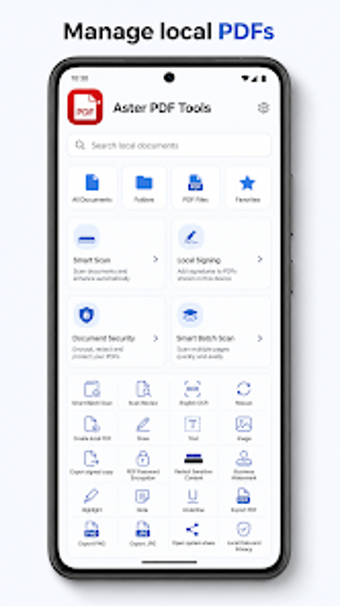
Aster PDF Tools, from BVAsian, is an Android app built as a local PDF workspace for professionals and students who handle sensitive documents. It provides scanning, redaction, searchable text, and encryption without requiring an account, keeping processing on-device. Key capabilities include batch scanning, on-device OCR for English text, local signing, and password-based AES-256 file protection. The app targets mobile users who need a self-contained, privacy-oriented document tool for everyday office and academic tasks.
How does the app keep documents under user control?
Aster operates as a privacy-first, local workspace, processing files entirely on the device and avoiding cloud sync or account requirements, which ensures sensitive material does not leave the handset. The app applies AES-256 password encryption for protected files and stores generated copies in app-private storage. The developer also does not persist passwords or signature data inside the app, aligning with workflows that require tight local control over document handling.
What daily document tasks does it enable for mobile professionals?
The tool supports a Smart Batch Scan routine that captures up to 20 pages with quality inspection and page reordering, plus an integrated PDF viewer with zoom and review tools like Highlight, Note, and Underline. Users can mark content for redaction and export processed copies. These capabilities suit common tasks such as scanning meeting notes, annotating reports, and producing deliverables directly from an Android device.
Is the interface and onboarding suitable for office contexts?
The app minimizes permission friction by using secure system pickers instead of requesting direct camera or media access, and it uses Google Play services for its scanning flow. Signing options include drawn, typed, or image-based marks, while watermarking allows adjustable opacity and text customization. Typical office users encounter standard PDF navigation controls, so onboarding is focused on learning the app's review and signing widgets rather than basic file handling.
Does it produce compatible outputs and perform reliably on mobile hardware?
Aster provides on-device OCR for English and Latin characters, and its redaction tool flattens marked areas in exported copies to permanently hide content. Export options include PDF, PNG, and JPG formats, which supports cross-tool sharing. The app emphasizes lightweight performance to avoid cloud overhead and relies on Android system file access for document management, matching typical mobile hardware constraints in professional environments.
Aster suits privacy-minded mobile professionals who need device-centric PDF workflows
Aster is a practical option for privacy-conscious professionals and students who require a self-contained Android PDF workspace. The mobile-focused design favors individual contributors and small teams that accept device-centered document handling rather than replacing desktop automation. One trade-off: users who depend on certified digital signature workflows or deep desktop batch automation may need a complementary desktop solution alongside this app.